
Today we're releasing a new version of the Chrome/Edge extension, v. 6.42.27. The Firefox extension will follow in the near future. At the same time, we're also releasing a new version of Team Password Manager, v. 14.184.308.
Let me explain what we've included in these new versions:
Chrome Extension v. 6.42.27
This is a major rewrite of the extension. Here are the main changes:
1. Re-architected Connection
We've re-architected how the extension connects to Team Password Manager to eliminate random disconnects.
Now, once you've connected to your Team Password Manager installation, the extension remains connected until you log out of Team Password Manager or manually disconnect the extension (using the Disconnect button in the popup window).
Random disconnections are now a thing of the past. If, for some reason, the connection to your installation fails (for example, due to a networking error), the extension will still remain linked to it. When the issue is resolved, the extension will automatically reconnect to your installation.
We've also improved the error messages shown by the extension to make them clearer and more helpful.
2. Automatic Connection Only
From now on, the connection between the extension and your Team Password Manager installation is only automatic. You just need to log in to your Team Password Manager installation for the extension to connect.
In previous versions, we kept a manual connection method (based on the API) mainly as a workaround for the random disconnections experienced by some users. Now that those disconnections have been resolved, the manual connection method has been removed.
We believe the automatic connection provides a better experience and should be the only way for the extension to interact with your Team Password Manager installation. Here are the main reasons:
- Works with all authentication methods: local users, LDAP, and SAML
- Uses a dedicated communication channel with the Team Password Manager installation. This allows us to provide extension-specific data and ensures that activity is correctly recorded in the logs as extension events.
- Simpler and more maintainable codebase, since we no longer need to maintain separate logic for manual/API connections and automatic connections.
3. More data in the Popup window
Passwords shown in the Popup window now include additional information. Specifically, the extension can now display:
- Expiry date and status
- Custom fields of type OTP and date
- Custom fields for My Passwords
- Favorite and Archived status for My Passwords
- Archive functionality for My Passwords
- Other related metadata
Note that this feature requires the extension to be connected to Team Password Manager v. 14.184.308 or later.
4. The Save Password feature has been moved to the Popup
In previous versions, when you entered credentials in a web form, a separate screen would appear allowing you to save the credentials to Team Password Manager. The problem was that if this screen was ignored or left open, it could remain hidden and easily go unnoticed.
We've now moved this functionality to the extension's Popup window, in a new tab called "Save Password":
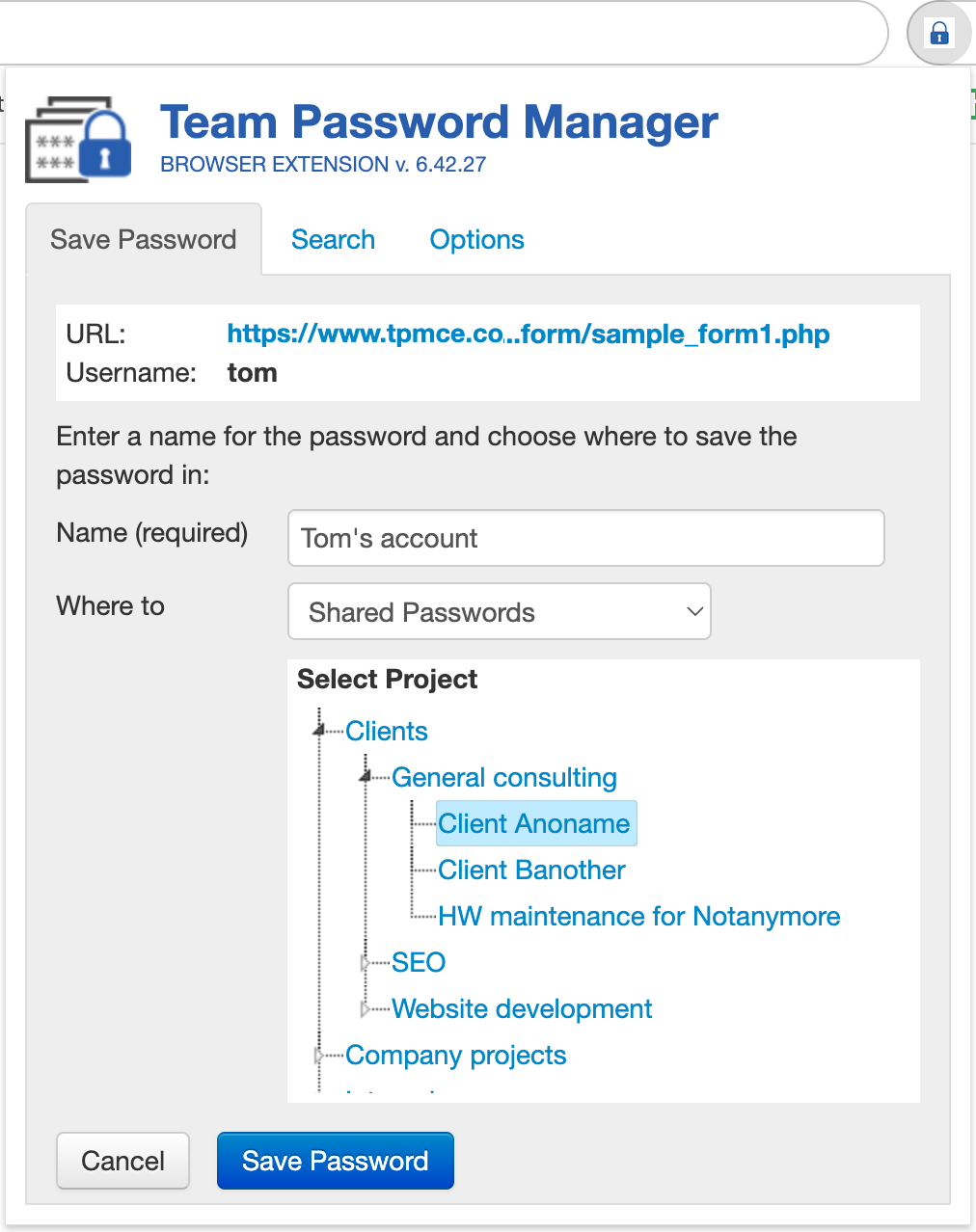
This tab remains visible until you either click “Cancel” or save the password.
5. Security Improvements
This release also includes several security enhancements to further strengthen the extension:
- Protection against DOM-based extension clickjacking. We have implemented mitigations for the vulnerability described here: https://thehackernews.com/2025/08/dom-based-extension-clickjacking.html
- Randomized CSS classes for detected fields. The extension now randomizes the CSS classes used for detected form fields, making it harder for websites to identify or target them through CSS selectors.
- Patched Bootstrap JavaScript components. We have applied patches addressing several known XSS vulnerabilities in Bootstrap’s JavaScript components.
These improvements increase the overall security and robustness of the extension when interacting with web pages.
Chrome Extension v. 6.42.27 Changelog.
New Team Password Manager version 14.184.308
This new version of Team Password Manager includes the following main changes:
- Additional data for the browser extension. The application now provides the extension with additional information required for the new features described in point 3 of the Chrome Extension v. 6.42.27 section above.
- Security improvements. Several security-related updates have been implemented, including:
- Fixes for vulnerabilities in the user password reset functionality.
- Patches applied to Bootstrap JavaScript components to address multiple XSS vulnerabilities (Bootstrap is the UI library we use).
Team Password Manager v. 14.184.308 Changelog.
Thank You for Your Feedback
Your feedback and suggestions continue to drive the evolution of Team Password Manager and the browser extensions. We hope you enjoy the improvements in this release, and we look forward to hearing how it works for you!
